iProxy.online logo
Proxies for
Resources
Company
Search icon
/
EN
English
PortuguĂȘs
РуссĐșĐžĐč
Español
TĂŒrkçe
ĐŁĐșŃ€Đ°Ń—ĐœŃŃŒĐșа
Tiáșżng Việt
àč„àž—àžą
äž­æ–‡
à€čà€żà€‚à€Šà„€
Show menu icon

Buy Mobile Proxy For Dolphin Anty

Running Dolphin Anty without reliable mobile IPs usually ends the same way: profiles link, sessions get flagged, scale stalls. Mobile proxies change that. With iProxy, a regular Android phone becomes a private 3G/4G/5G proxy in minutes, ready to plug into Dolphin Anty and work as a clean, isolated network identity.

iProxy is built for setups where control matters. You decide when the IP rotates, how long a session lives, which protocol to use, and how many access points one device exposes. No USB modems, no Raspberry Pi stacks, no shared traffic in between. Just your phone, your SIM, and a proxy Dolphin Anty treats like a real mobile user.

This approach fits teams and solo operators managing multiple Dolphin Anty profiles for ads, e-commerce, scraping, or automation. Setup takes under five minutes, scaling is linear (add another phone), and traffic isn’t capped by software. You keep the real geolocation of the device, which matters more than people think.

Start with a free 2-day trial. No card, no commitments.

Try mobile proxies for Dolphin Anty
Hero block image

What is Dolphin Anty?

Dolphin Anty is an anti-detect browser designed for working with multiple online profiles in parallel. Each profile runs in its own isolated environment, with separate fingerprints, cookies, storage, and network settings. From the outside, those profiles look like different real users accessing the internet from different devices.

The browser is widely used in affiliate marketing, traffic arbitrage, e-commerce, scraping, and social media automation. Anywhere one account isn’t enough, Dolphin Anty tends to show up. Users create profiles, assign proxies, tune fingerprints, then run sessions independently without them bleeding into each other.

What makes Dolphin Anty practical is control. You can manage dozens or hundreds of profiles from a single interface, automate launches, and integrate external tools. But the browser alone doesn’t solve networking. Without proper proxies, profiles still share IP signals, and that’s where setups usually break.

That’s why proxies aren’t optional here. Dolphin Anty expects each profile to have its own stable, believable IP address. Mobile proxies work especially well, since mobile networks naturally rotate IPs and tolerate higher activity patterns. Pairing Dolphin Anty with real mobile IPs gives profiles room to operate without constant friction.

Running Dolphin Anty at scale?
Give each profile a real mobile IP, not a shared workaround. Set up a private Dolphin Anty proxy on your own Android device in minutes and control rotation, sessions, and access points from one place.
Start free 48-hour trial

Why are Proxies Used in Dolphin Anty anti-detect Browser?

Dolphin Anty is built around the idea of isolation. Each profile should behave like a separate person with its own device, browser environment, and network. Proxies are what make that isolation believable on the network level. Without them, profiles may look different locally, but still come from the same IP range, which defeats the point.

Efficient Profile Separation

When working with multiple profiles, each one needs a unique IP address. A Dolphin Anty proxy assigns a distinct network identity to every profile, so platforms see them as unrelated users. Mobile proxies are especially effective here because mobile IPs are shared across real subscribers and rotate naturally, which looks normal to most platforms.

This setup is common for:

affiliate marketers running parallel ad accounts

e-commerce teams managing several seller profiles

automation workflows where profiles stay active daily

With mobile proxies for Dolphin Anty, profiles don’t collide at the IP level, even when running side by side.

Lower Risk of Blocks and Flags

Many platforms treat mobile traffic differently from datacenter or cheap residential IPs. Mobile networks tolerate higher activity, frequent logins, and IP changes. That’s why Dolphin Anty proxies based on real mobile SIM cards tend to survive longer.

IP rotation also matters. If an IP gets rate-limited or temporarily flagged, rotation replaces it without killing the profile. iProxy lets you rotate IPs manually, on a schedule, via API, or straight from Telegram, so response time stays short.

Stable Automation and Scaling

Automation inside Dolphin Anty depends on predictable networking. Shared or unstable proxies introduce noise: random disconnects, sudden bans, inconsistent sessions. Mobile proxies smooth this out.

One Android device can expose multiple proxy ports, which means:

several Dolphin Anty profiles per phone

independent sessions from one physical device

simpler scaling without extra hardware

As setups grow, this model stays manageable. Add phones, add proxies. No infrastructure redesign needed.

In short, proxies aren’t an add-on for Dolphin Anty. They’re a core requirement. Mobile proxies make that requirement easier to satisfy, especially when stability and long-term use matter more than short-term volume.

Block icon

Traditional proxy setups often fail at the exact moment scale matters. Shared pools mix traffic, datacenter IPs get flagged fast, and residential proxies behave inconsistently under load. You end up compensating with more profiles, more retries, more manual checks — and still lose accounts.

iProxy.online takes a different route. Every Dolphin Anty proxy runs on a real Android device with its own SIM and mobile network identity. No shared IP pools, no hidden routing layers, no third-party traffic. Profiles stay isolated, IP rotation stays predictable, and scaling means adding phones, not complexity.

How To Set Up Proxies In Dolphin Anty?

Below is a simple Dolphin Anty proxy integration flow. It works the same for HTTP/SOCKS5 proxies, and it’s especially handy for mobile proxies for Dolphin Anty when you want quick IP rotation.

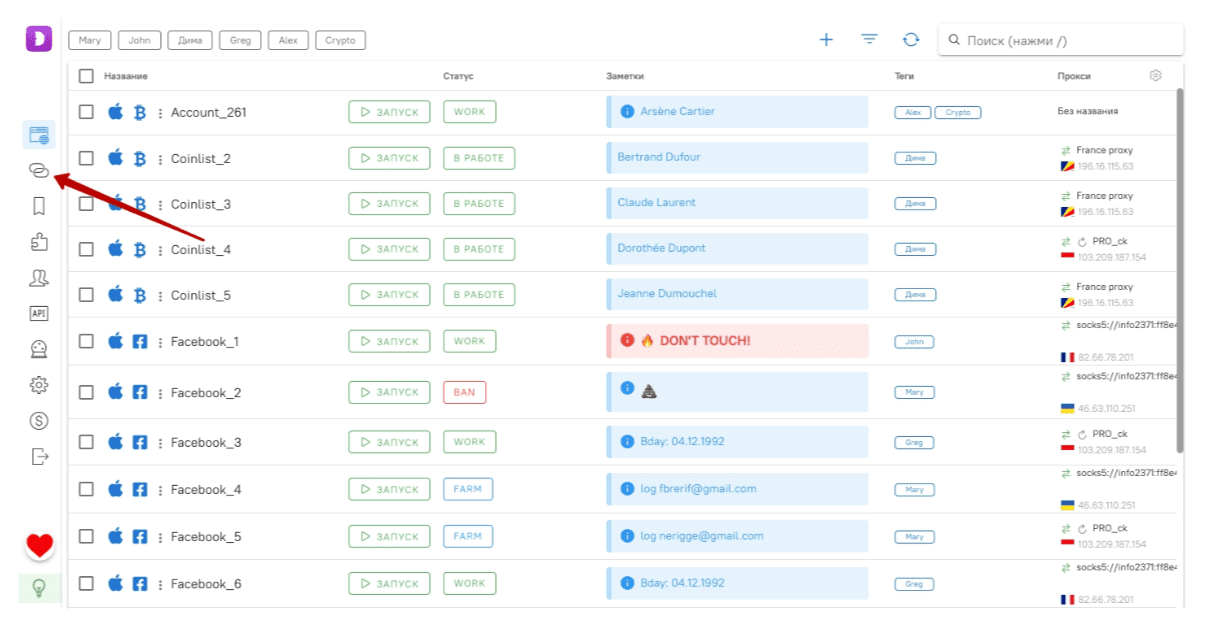
Step 1 — Open the Proxies section

Click the proxy icon in the left sidebar.

How to setup step image

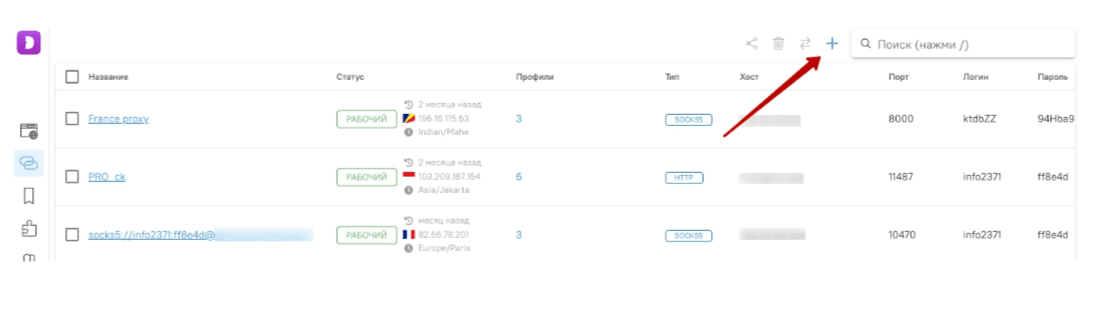
Step 2 — Add a new proxy list

How to setup step image

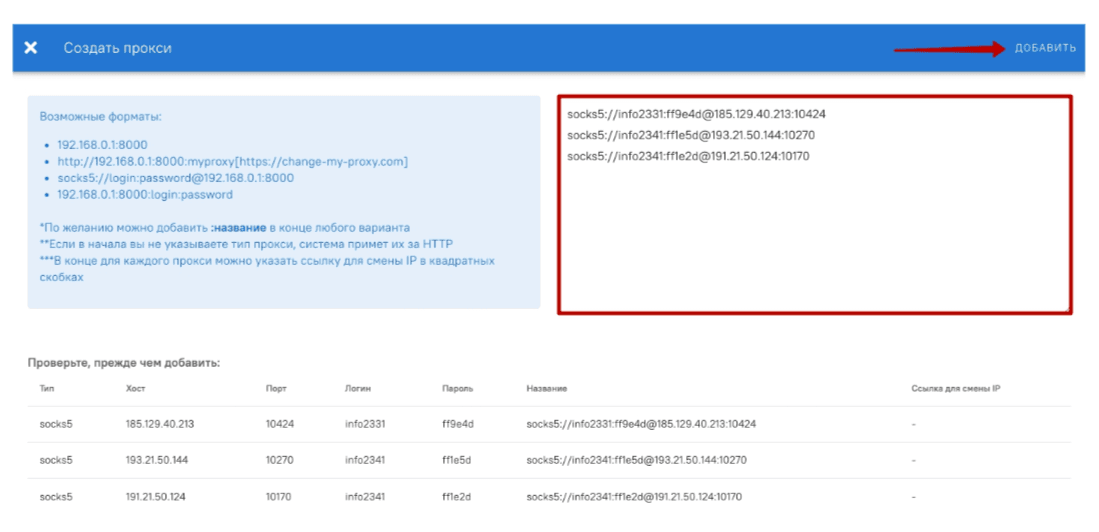
Step 3 — Paste proxies and save

In the window that opens, paste your proxy (or multiple proxies, one per line) into the right-side field. Then click Add.

Format example (single proxy):

SOCKS5://login:password@IP:PORT

How to setup step image

Step 4 — Add an IP-change link (for mobile proxies)

If you’re using iProxy, you can attach an IP rotation URL after each proxy in square brackets. Dolphin Anty will store it together with the proxy, so you can trigger rotation when needed.

Example (mobile Dolphin proxy with rotation link):

socks5://info2331:[email protected]:10424[https://iproxy.online/api-rt/changeip/PfMlxTEqDd/x6R35PPATHP92HMYFT52G]

That bracket part is the key difference for Dolphin Anty proxies that support fast rotation.

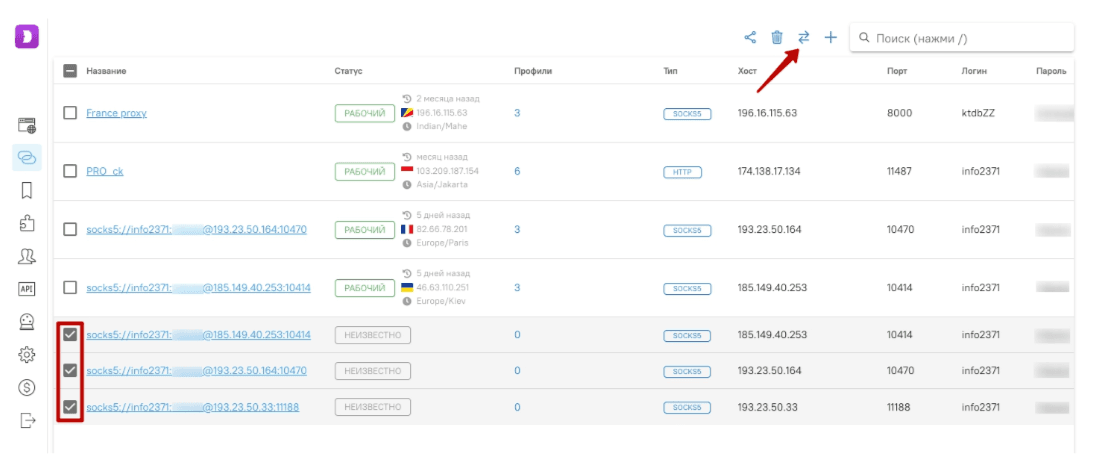
Step 5 — Check connection

Select the proxies (checkboxes on the left) and click the connection test button.

If everything is fine, the status will show “Working”.

How to setup step image

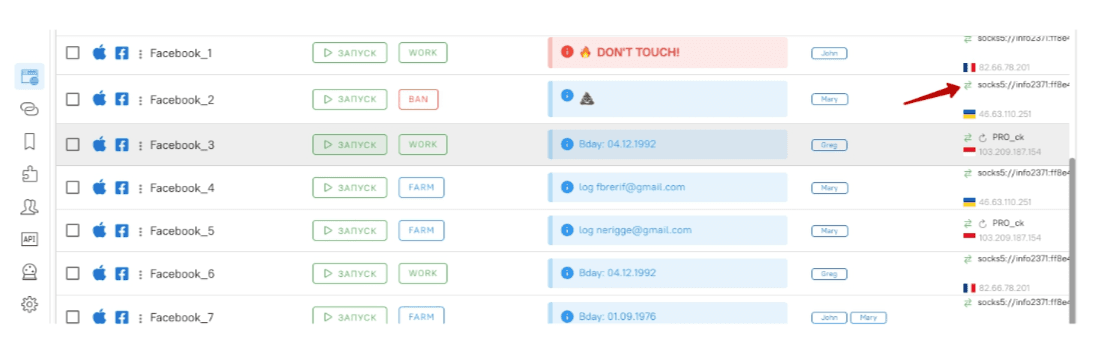
Step 6 — Change IP when needed

To rotate the IP for a mobile proxy, click the IP-change icon on the main profiles screen.

How to setup step image

That’s it. Your proxies for Dolphin Anty are added and ready to assign to profiles, so each profile runs on its own IP, not a shared one.

Why Choose Mobile Proxies For Dolphin Anty From iProxy?

Dolphin Anty needs proxies that behave like real users over time, not just during a short session. That’s where iProxy fits naturally. It’s built around real Android devices and SIM cards, so the network layer matches what the browser is trying to simulate.

Benefit icon

Quality

Private mobile proxies built on real Android devices with real SIM cards. Each proxy is fully under your control (no shared pools), so Dolphin Anty profiles stay separated at the network level.

Benefit icon

Cost-Effectiveness

Plans start at $6 per device / 30 days. You can scale with regular phones instead of buying modems, hubs, racks or running extra infrastructure.

Benefit icon

Easy Management and Configuration

Create a proxy in under 5 minutes, then manage rotation, sessions, ports, DNS, and monitoring from the dashboard, mobile app, or Telegram bot. Setup stays simple even when you run dozens of profiles.

Benefit icon

Responsive Support

Support is handled by real people who understand proxy setups and networking, not scripted “first-line” replies. When something breaks, you get practical troubleshooting, not copy-paste.

Benefit icon

Technical Features

Key things iProxy gives you for Dolphin Anty proxy integration:

  • Unlimited IP rotation: manual, scheduled, via API, or Telegram bot.

  • Multiple proxy ports per device: run several Dolphin profiles from one phone.

  • Protocols: SOCKS5, HTTP, oVPN, UDP.

  • Passive OS fingerprinting control: spoof/replace TCP/IP + device-level fingerprints.

  • Traffic visibility: usage, uptime, active sessions.

  • Custom DNS + API: automate creation, rotation, monitoring.

  • Unlimited bandwidth within plan tiers.

  • Global coverage: keep the real geolocation of the device (no fake geo).

  • Private by design: proxies run on your devices, no third-party access to traffic.

Need Dolphin Anty Proxies with a Different Geo-Location?

iProxy enables you to create mobile proxies from your device, but the geo-location will always be the same as your device's actual location. If you need proxies from another location, we suggest contacting our trusted sellers.

These vendors use our service and manage «proxy farms» with numerous phones in various countries and cities. They provide quality private mobile proxies at competitive prices – check them out yourself!

How to Buy Proxies for Dolphin Anty: Our Tariffs

Baby

Great Plan with Essential Features

$6

per 30 days

Make mobile proxy

    BigDaddy

    All Baby plan features, but with increased limits

    $8

    per 30 days

    Make mobile proxy
      Best for Dolphin Anty
      Best for

      BigDaddy Pro

      A plan with PROfessional settings for real experts!

      2 days for free!
      $10

      per 30 days

      Try for free
        Learn more about tariffs

        Clients Speak: Why We're Trusted

        Review icon

        I was thoroughly impressed with the software I purchased from this company. Not only was the interface user-friendly and the instructions clear, but the software also had an amazing wifi split feature. This feature alone made my experience with the software outstanding. The support team was also top notch, always available to answer any questions I had. I would highly recommend this company to anyone in need of quality software with unbeatable features like the wifi split.

        Review icon

        When I watched the video on Youtube, showing how one can get mobile proxies through iProxy, I was skeptical. I had tried similar services and the problem was that the speed was very VERY slow. I was impressed when iProxy gave me easily a speed of 30Mgpbs, which is sufficient for my project. The customer support throught Telegram is exceptional. I am now going to buy more connections and scale up my project.

        Review icon

        Very interesting software. The company likely invested a lot of time and money into its development. I've been working with them for a short time, but have already concluded that the technical support service is of high quality. Communication happens via Telegram. The technical support team even helped me on weekends.

        Review icon

        The interface is very nice and simple to use, and you can contact the support solution-oriented whenever you want.

        Review icon

        I recently used software from this company and was blown away by its performance. The software worked seamlessly on my Android device without the need for root privileges. This was a huge bonus for me as I like to keep my device secure. The user interface was user-friendly and the instructions were easy to follow. The support team was also fantastic, always available to answer any questions I had. Overall, I highly recommend this company for anyone in need of software that works exceptionally well even without root privileges on Android.

        Review icon

        I've tried many software similar to what this company develops and I can confidently say they are the best. At the moment, root access on new Android phones is not possible which greatly limits functionality. However, the programmers of this company have done everything possible to solve this issue and now everything works smoothly. I am completely satisfied with the program and my plan. I highly recommend it for use.

        Review icon

        Iproxy is the best proxy, it has a fast, reliable and secure connection and it helps me a lot on a daily basis because I advertise on facebook ads and I need a proxy for contingency profiles.

        Review icon

        Excellent ability to manage groups of devices. I recently purchased software from this company and was extremely satisfied with my experience. The interface was intuitive and the instructions were straightforward. One of the standout features for me was the ability to create device groups within the software. This made managing multiple devices much easier and more organized. The support team was also incredibly helpful, responding promptly to any questions I had. Overall, I highly recommend this company for anyone in need of software with excellent features like device group management.

        Review icon

        Good work ! I like this. Test on device : Asus Max Pro M1 ( Andro version 9 )

        Review icon

        A tool that surprises. This tool is a gift to the modern world. For those who need proxies, it helps a lot with everyday tasks. The development team is to be congratulated on the business idea. Keep up the good work you are doing.

        Review icon

        God bless you guys! I used this service for creating my own proxies and it worked amazing, the process is so so easy and their support is amazing! Thank you guys!

        Review icon

        The easiest, simplest and most intuitive tool on the market. Honestly, I didn't know iProxy was so easily configured. I saw my friends using the platform, but it was only after using it myself that I realized how simple the system is.

        Review icon

        Delivers what it promises It is really the best option I have used to create proxies using the mobile network of my cell phone. Besides the interface and configuration are very simple.

        Review icon

        Great service and amazing support đŸ«¶ Great service and amazing support đŸ«¶ Invested so much time helping me resolve the technical issues and really help me improve my basic knowledge

        Review icon

        I work with Facebook Ads arbitrage, and I used to buy proxies, but it's way cheaper to set up your own. I don’t have that many profiles, maybe 15. everything's great! the app is works on my tablet, love the interface, simple to use.

        Review icon

        Iproxy is the best proxy, it has a fast, reliable and secure connection and it helps me a lot on a daily basis because I advertise on facebook ads and I need a proxy for contingency profiles

        Review icon

        The best app ever I've been using it for almost a 3 months , and they have very good instant support

        Review icon

        The app is excellent, works as supposed to and it's a life saver, they offer so much for a small price. Loved it! It's very simple to use and the telegram support helped me so well, they were committed to solve my problem and did so with simplicity.

        Review icon

        Truly-the app didn't work at the 1st shot but one thing that i have never seen with other proxy providers is that the tech support helped me continuously for 24hrs untill the root issue was found! Now I'm enjoying the Iproxy with no errors, hatsoff to Iproxy tech and support team! if you are looking to use it, jujst give a try and if there's any error then you have the telegram tech support always active and helpful! So there's nothing to worry about.

        Review icon

        I just started using this company's software and I have to say that it's a alot better than the access point on my phone. The software is both faster and safer, which makes my life much easier and gives me less to worry about.

        Review icon

        Great app and the support was great đŸ€ love it

        Review icon

        I was thoroughly impressed with the software I purchased from this company. Not only was the interface user-friendly and the instructions clear, but the software also had an amazing wifi split feature. This feature alone made my experience with the software outstanding. The support team was also top notch, always available to answer any questions I had. I would highly recommend this company to anyone in need of quality software with unbeatable features like the wifi split.

        Review icon

        When I watched the video on Youtube, showing how one can get mobile proxies through iProxy, I was skeptical. I had tried similar services and the problem was that the speed was very VERY slow. I was impressed when iProxy gave me easily a speed of 30Mgpbs, which is sufficient for my project. The customer support throught Telegram is exceptional. I am now going to buy more connections and scale up my project.

        Review icon

        Very interesting software. The company likely invested a lot of time and money into its development. I've been working with them for a short time, but have already concluded that the technical support service is of high quality. Communication happens via Telegram. The technical support team even helped me on weekends.

        FAQ about Mobile Proxies for Doplhin Anty

        What is Dolphin Anty, and how does it work with iProxy proxies?

        Dolphin Anty is an anti-detect browser for managing multiple profiles. iProxy provides mobile proxies for Dolphin Anty, giving each profile a real mobile IP so profiles stay isolated and less likely to be flagged.

        Can I manage multiple profiles with different proxies in Dolphin Anty?

        Yes. You can assign a separate Dolphin Anty proxy to each profile. With mobile proxies for Dolphin Anty, every profile runs on its own IP and session, even when launched at the same time.

        What types of proxies work best with Dolphin Anty?

        Mobile proxies are usually the safest option. Dolphin Anty proxies based on real 3G/4G/5G networks handle rotation and activity more naturally than datacenter or shared residential IPs.

        How many proxies do I need for Dolphin Anty?

        Typically one proxy per profile. iProxy lets you run multiple proxy ports from one Android device, so you can scale profiles without adding complex infrastructure.